Note
Go to the end to download the full example code.
Custom vertex shape#
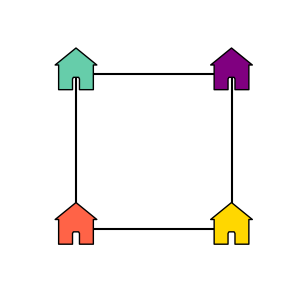
This example shows how to use a custom vertex shape in an iplotx graph.
These can be polygons, i.e. instances of matplotlib.patches.Polygon,
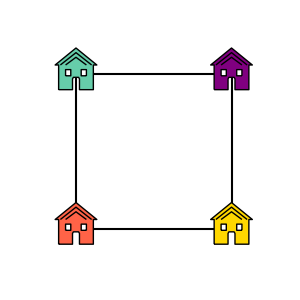
or more general paths, i.e. instances of matplotlib.path.Path.
Note
Both polygons and paths are rescaled to match the size or sizes specified
by the vertex_size (aka node_size) style in use.
from matplotlib.path import Path
from matplotlib.patches import Polygon
import matplotlib.pyplot as plt
import iplotx as ipx
import networkx as nx


g = nx.from_edgelist([
    (0, 1),
    (1, 2),
    (2, 3),
    (3, 0),
])
layout = [
    [0, 0],
    [1, 0],
    [1, 1],
    [0, 1],
]

# Example with a polygon
custom_marker = Polygon(
    [
        (-1, -1),
        (-0.2, -1),
        (-0.2, -0.3),
        (-0.15, -0.2),
        (0.15, -0.2),
        (0.2, -0.3),
        (0.2, -1),
        (1, -1),
        (1, 0.6),
        (1.2, 0.6),
        (0, 1.7),
        (-1.2, 0.6),
        (-1, 0.6),
    ],
)

ipx.network(
    g,
    layout=layout,
    node_marker=custom_marker,
    node_facecolor=["tomato", "gold", "purple", "mediumaquamarine"],
    node_edgecolor="black",
    node_size=30,
    figsize=(3, 3),
    margins=0.15,
)
[<iplotx.network.NetworkArtist object at 0x7dd1a58e3b10>]
And below is another example with a more general path:
main_house = Path(
    [
        (-1, -1),
        (-0.2, -1),
        (-0.2, -0.3),
        (-0.15, -0.2),
        (0.15, -0.2),
        (0.2, -0.3),
        (0.2, -1),
        (1, -1),
        (1, 0.6),
        (1.2, 0.6),
        (0, 1.7),
        (-1.2, 0.6),
        (-1, 0.6),
        (-1, -1),
    ],
)
window1 = Path(
    [
        (-0.6, -0.1),
        (-0.6, 0.3),
        (-0.3, 0.3),
        (-0.3, -0.1),
        (-0.6, -0.1),
    ]
)
window2 = Path(
    [
        (0.6, -0.1),
        (0.3, -0.1),
        (0.3, 0.3),
        (0.6, 0.3),
        (0.6, -0.1),
    ]
)
roof_highlight1 = Path(
    [
        (0.9, 0.6),
        (0, 1.4),
        (-0.9, 0.6),
    ],
)
roof_highlight2 = Path(
    [
        (0.6, 0.6),
        (0, 1.1),
        (-0.6, 0.6),
    ],
)
custom_marker = Path.make_compound_path(
    main_house,
    window1,
    window2,
    roof_highlight1,
    roof_highlight2,
)

ipx.network(
    g,
    layout=layout,
    node_marker=custom_marker,
    node_facecolor=["tomato", "gold", "purple", "mediumaquamarine"],
    node_edgecolor="black",
    node_size=30,
    figsize=(3, 3),
    margins=0.15,
)
[<iplotx.network.NetworkArtist object at 0x7dd1a58e3c50>]
Warning
Curved paths will not throw an error but might result in inaccurate edge joints. You can approximate Bezier curves with segments of straight lines if needed.
Tip
If you are creating non-degenerate polygons this way - polygons with holes such as the house above - remember that the filling of each individual path will be ignored if the are drawn anticlockwise (e.g. the roof roof highlights) and considered - that is, hollowed out - if drawn clockwise (e.g. the windows).
Total running time of the script: (0 minutes 0.048 seconds)