Note
Go to the end to download the full example code.
Network element showroom#
This example showcases various plot elements that can be styled in iplotx.
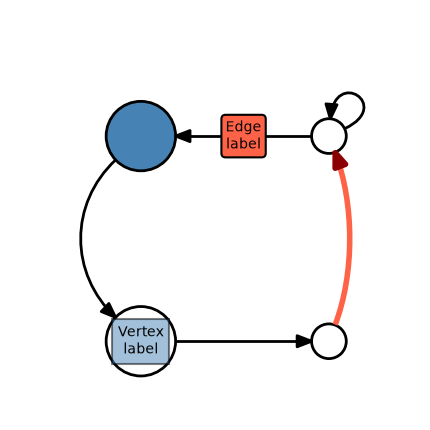
[<iplotx.network.NetworkArtist object at 0x7dd1979987d0>]
import matplotlib.pyplot as plt
import iplotx as ipx

network = {
    "edges": [(0, 1), (1, 2), (2, 3), (3, 0), (2, 2)],
    "directed": True,
}
layout = [(0, 0), (1, 0), (1, 1), (0, 1)]

fig, ax = plt.subplots(figsize=(4.3, 4.3))
ipx.network(
    network,
    layout,
    ax=ax,
    vertex_labels=["Vertex\nlabel"] + [""] * 3,
    edge_labels=["", "", "Edge\nlabel", "", ""],
    vertex_label_bbox_edgecolor="k",
    vertex_label_bbox_linewidth=1.5,
    vertex_label_bbox_facecolor="steelblue",
    vertex_label_bbox_alpha=0.5,
    edge_label_bbox_edgecolor="k",
    edge_label_bbox_linewidth=1.5,
    edge_label_bbox_facecolor="tomato",
    edge_color=["k", "tomato", "k", "k", "k"],
    edge_arrow_color=["k", "darkred", "k", "k", "k"],
    edge_linewidth=[2, 4, 2, 2, 2],
    vertex_facecolor=["w"] * 3 + ["steelblue"],
    vertex_edgecolor="k",
    vertex_linewidth=2,
    vertex_size=[50, 25, 25, 50],
    vertex_marker="o",
    vertex_label_color="k",
    edge_curved=True,
    edge_tension=[0, 1.25, 0, 3.5],
    margins=(0, 0.08),
)
Total running time of the script: (0 minutes 0.040 seconds)