Note
Go to the end to download the full example code.
Half arrows#
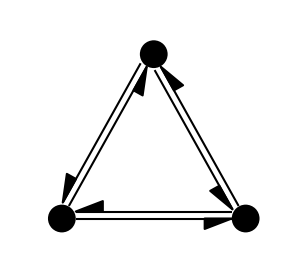
This example demonstrated the use of half arrows for directed graphs.
import matplotlib.pyplot as plt
import iplotx as ipx

g = {
    "edges": [
        ("alice", "bob"),
        ("bob", "alice"),
        ("alice", "jago"),
        ("jago", "alice"),
        ("bob", "jago"),
        ("jago", "bob"),
    ],
    "directed": True,
}

layout = {
    "alice": (0, 0),
    "bob": (1, 0),
    "jago": (0.5, 0.85),
}

fig, ax = plt.subplots(figsize=(3, 2.7))
ipx.network(
    g,
    layout=layout,
    ax=ax,
    edge_arrow_marker="|/",
    edge_paralleloffset=-7,
    edge_arrow_width=15,
)
[<iplotx.network.NetworkArtist object at 0x7dd1a6045810>]
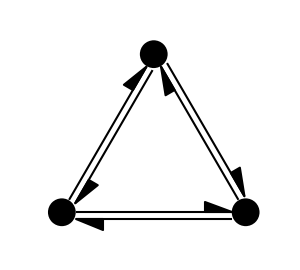
A similar effect can be obtained with the other half arrow, by flipping the paralleloffset sign as well. In this case the opposite half arrow is shown:
fig, ax = plt.subplots(figsize=(3, 2.7))
ipx.network(
    g,
    layout=layout,
    ax=ax,
    edge_arrow_marker="|\\",
    edge_paralleloffset=7,
    edge_arrow_width=15,
)
[<iplotx.network.NetworkArtist object at 0x7dd1a600df90>]
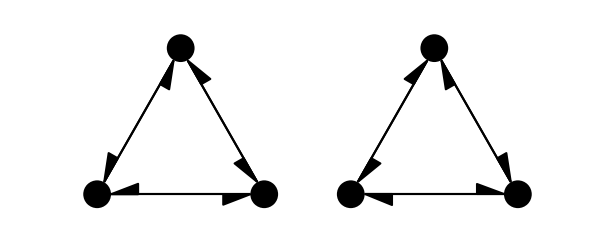
If no parallel offset is set, the effect is a little different:
fig, axs = plt.subplots(1, 2, figsize=(6, 2.4))
for ax, marker in zip(axs, ["|/", "|\\"]):
    ipx.network(
        g,
        layout=layout,
        ax=ax,
        edge_arrow_marker=marker,
        edge_paralleloffset=0,
        edge_arrow_width=15,
    )
Total running time of the script: (0 minutes 0.111 seconds)